K53 Simulator logoK53 Simulator
  • Home
  • How It Works
    • Quick Start Guide
    • Mobile Control Buttons
    • Keyboard & Mouse
    • Gamepad & Joystick
    • Steering Wheel
    • Difficulty Levels
    • Tips
  • Practice Driving
  • Drive Online
  • Account
    • Cart
    • Checkout
    • My account
  • For Schools
    • Quick Start Guide
    • Lite Simulator Setup
    • Training Hardware Options
    • Driving Simulator Hardware
  • Shop

Shop

Home / Shop

Showing all 11 results

  • k53 Simulator Online Practice Subscription
    GamesOnline Practice

    1 Month Access (Practice Online)

    Gain 1 month access to the online version of K53 Simulator

    R20,00

  • k53 Simulator Online Practice Subscription
    Games

    1 Year Access (Practice Online)

    Gain 1 Year access to the online version of K53 Simulator

    R30,00

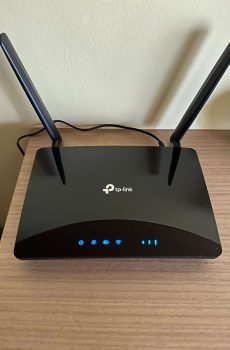
  • Archer MR600 AC1200Mbps 4G+ Cat6 Wireless Dual Band 4G Router With Sim Slot (Unlocked to all network)
    Sale!
    Used

    Archer MR600 AC1200Mbps 4G+ Cat6 Wireless Dual Band 4G Router With Sim Slot (Unlocked to all network)

    A used TP-Link Archer MR600 4GB+ router in good working condition. I am just selling this mainly because we have fibre at our new location and I can use the cash. Router shows usages marks here and there.

    • This router is selling for, R1800 at Amazon (new)
    • To be shipped (or at least booked for) the same day
    • May call …

    R600,00 Original price was: R600,00.R350,00Current price is: R350,00.

  • k53 Simulator Online Practice Subscription
    Driving Schools

    For Driving Schools – 10 unlock codes

    Bulk unlock codes for 10 students at discounted pre-order price.

    R200,00

  • K53 Simulator Driving School Edition
    Sale!
    School Subscription

    For Driving Schools – Monthly Subscription (1 Month)

      Use the K53 Simulator on your computer system(s) with unlimited monthly students for 1 month. Kindy reach out to us for more information on this. Yes, you can get started with the K53 Simulator with just a computer keyboard or gamepad? This is also a great way to give the simulator a production test before upgrading to more vehicle …

      R200,00 Original price was: R200,00.R100,00Current price is: R100,00. every month

    • K53 Simulator Driving School Edition
      Sale!
      School Subscription

      For Driving Schools – Quarterly Subscription (3 Months)

        Use the K53 Simulator on your computer system(s) with unlimited monthly students for 3 months. Kindy reach out to us for more information on this. Yes, you can get started with the K53 Simulator with just a computer keyboard or gamepad? This is also a great way to give the simulator a production test before upgrading to more vehicle …

        R450,00 Original price was: R450,00.R200,00Current price is: R200,00. every 3 months

      • K53 Simulator Driving School Edition
        Sale!
        School Subscription

        Internet Cafe – Monthly Subscription (1 Month)

          Use the K53 Simulator on your computer system(s) with unlimited monthly students for 1 month. Kindy reach out to us for more information on this.

          R50,00 Original price was: R50,00.R15,00Current price is: R15,00.

        • K53 Simulator Driving School Edition
          Sale!
          School Subscription

          Internet Cafe – Monthly Subscription (6 Months)

            Use the K53 Simulator on your computer system(s) with unlimited monthly students for 6 months. Kindy reach out to us for more information on this.

            R300,00 Original price was: R300,00.R50,00Current price is: R50,00.

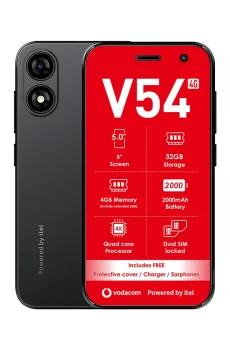
          • Itel V54 4 inch Android 12 Go Edition Smartphone
            Sale!
            Personal Pawns

            Itel V54 4 inch Android 12 Go Edition Smartphone

            An Itel V54 bought in November last year at R450 from PepCell. Comes with a cover and the screen guard it came with was never removed.

            May call me before (for more info) or after making payment (0798132555/0765430965)

            R400,00 Original price was: R400,00.R170,00Current price is: R170,00.

          • K53 Simulator Executable (EXE) - for Windows & Linux
            Sale!
            Games

            K53 Simulator Executable (EXE) – for Windows & Linux

            A pay-once executable (EXE) – Supported by both Windows 10/11 as well as other Windows versions that do not feature the Microsoft Store (such as Win 7, etc). Linux version now also included for those with system running OS like Ubuntu.

            R25,00 Original price was: R25,00.R20,00Current price is: R20,00.

          • ZTE G5TS 5G Router (Like New)
            Sale!
            Used

            ZTE G5TS 5G Router (Like New)

            A barely used (as we were about to relocate when it came, and we found fibre connection at our new location) ZTE G5TS 5G router. So it is essentially just like new.

            • May call me before (for more info) or after making payment (0798132555)
            • PayFast option available

            R2500,00 Original price was: R2500,00.R1000,00Current price is: R1000,00.

          PayFast Methods:

          RCS includes (amongst others) store cards such as Jet, Edgars, Makro, Game, Builders, CTM,:

          Also Accepted:

          Vodacom and MTN payment gateway for K53 Simulator
          Personal users only

          Vodacom/MTN Airtime


          Stndard bank

          Direct EFT to our Business Accounts

          Payment Processor:

          K53 Simulator uses Payfast
          Kindly contact for an invoice or address

          • Blog
          • About K53 Simulator
          • Bug Tracker
          • Changelog
          • Contact us
          © 2026 K53 Simulator. All Rights Reserved.
          Registered Name: K2025937936 (SOUTH AFRICA) | Reg: 2025/937936/07

          Driving schools/instructor promo: R200 for 12 months. Kindly contact for more info.

          I recently downloaded your game from the Play Store and I really enjoy the concept. It has a lot of potential, especially for people practicing for the K53 learner’s license. However, I’ve noticed a few issues and have some suggestions that could greatly improve the experience:
          Issues & Bugs
          “Start Driving Now” option not working:
          When I press the Start Driving Now button, nothing happens. The only option that works consistently is the Mode option.
          Premium purchase not saving:
          When I pay for the Premium version, it works at first. However, after exiting or reopening the game, the Premium version is gone and I’m asked to pay again.
          360° challenge not registering:
          The game asks me to complete a 360° turn before driving. I perform the action, but the game still says I didn’t complete it.
          Suggestions for Improvement
          Account login system:
          Please add login options (email, Google, or Facebook). This way, Premium purchases are linked to an account and won’t be lost if the game is reinstalled or played on another phone.
          Tutorial system:
          A short tutorial explaining what each button does would help a lot.
          For example:
          “To perform a 360°, press this button”
          This would make it clear whether the player is doing something wrong.
          Fuel system issue:
          When I start a new game, the fuel gauge is already empty, making it impossible to drive properly.
          Traffic system:
          Even when traffic is enabled, there are very few cars. Increasing traffic density would improve realism.
          Performance & loading:
          The game sometimes feels slow and takes long to load. Performance optimisation would improve gameplay.
          Overall, this is an amazing game with strong potential. With these fixes and improvements, it could be an excellent learning and practice tool for K53 learners and driving practice in general.
          Thank you for your hard work, and I hope this feedback helps improve the game.

          Are you exploring the K53 Simulator for yourself as a learner driver, or for your learners as a driving school?


          Learner Driver
          Driving School

          1. Enhanced Practice and Repetition The core value of the simulator is the ability to practice K53 procedures repeatedly without the limitations of a real car. Instructors can explain a maneuver—like the parallel park or three-point turn—and then the student can immediately go on the simulator to practice it dozens of times. This helps a student build muscle memory and confidence before they get behind the wheel, which saves both the student’s time and the instructor’s.

          2. Focus on Mental and Procedural Fidelity While a real car truly provides a tactile experience, the simulator excels at reinforcing the K53’s procedural and mental aspects. The instructor can use the simulator to:

          • Drill the K53 observation sequences: Students can practice the “mirror-signal-blind spot” sequence until it becomes second nature, reducing errors during the actual test.
          • Reinforce rules of the road: The simulator can test a student’s knowledge of road signs, markings, and traffic light sequences in a dynamic, risk-free environment.
          • Practice defensive driving: Instructors can set up scenarios that teach students how to anticipate hazards, manage following distances, and react appropriately to unexpected events—all without the danger of a real-world mistake.

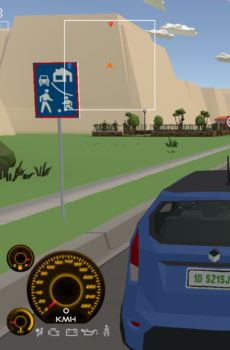
          Your task is to drive from randomly picked starting points to randomly picked destinations, following the K53 Driving Manual.

          Key:

          The destination marker: This is where you ever drive to except for when your vehicle needs repairs.

          The fuel/filling station marker: You can refill fuel when low. Turn off the engine first.

          The auto-repairs marker: You cannot complete a drive test if your vehicle is showing a dashboard warning light. You need to have it serviced here first.

          Already implemented K53 Driving Rules

          • Keep left and pass right
          • Indicate your intention to turn or enter the public road
          • Put on the safety belt when driving forward on the public road
          • Indicate to overtake (as well as returning to your lane)
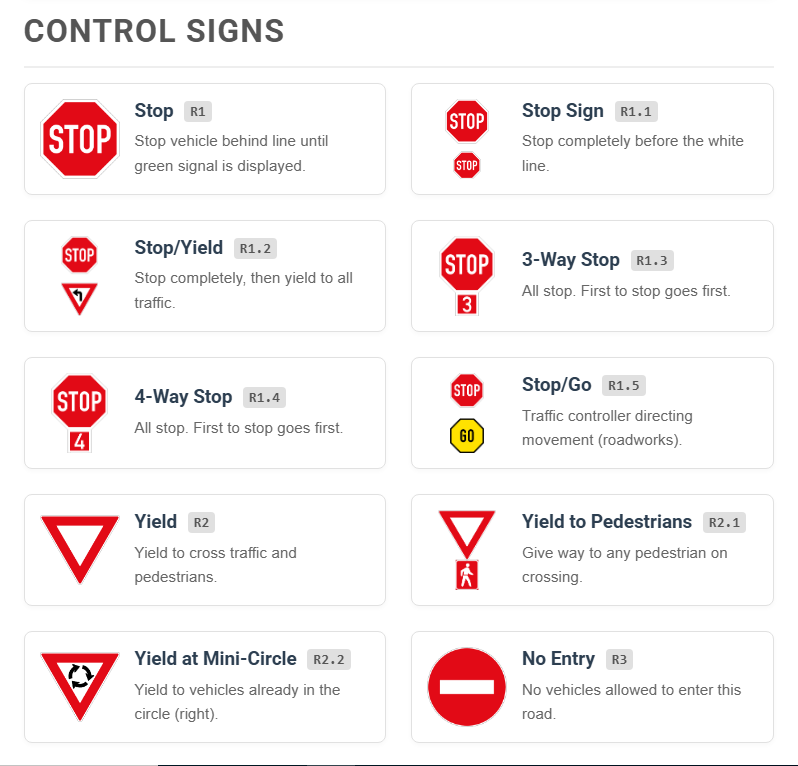
          • Crossing a mini circle intersection
          • Crossing a four ways stop intersection
          • Crossing a 3 ways stop intersection
          • Crossing a level crossing
          • Crossing traffic lights controlled intersection
          • Braking and down shifting sequence before turning
          • Vehicle positioning before turning
          • Vehicle positioning (follow your path) when turning at an intersection
          • Crossing a yield intersection
          • Rear mirror, side mirror and blind spot (3 point observation) before indicating
          • Left blind spot, mirrors and right blind spot (5 point or 360 degrees observation) before taking of from a standstill.
          • Incline ‘Uncontrolled rollback’
          • Ensuring Neutral or Park is selected before starting a vehicle
          • Applying the parking brake when stationary for any amount of time
          • Unjustified coasting of the clutch
          • Turning off the engine before refilling fuel
          • Ensuring the signal/indicator is cancelled after a turn is completed
          • Yielding to oncoming traffic before turning right

          Yard Test Mode

          You are to get instructions before each manoeuvre starts. Time is allocated – within which you must complete the manoeuvre.

          For PC, refer to the Keyboard or Gamepad controls. Kindly contact if you have any question – can be Whatsapp or email.

          • Use the arrow keys to steer, brake and accelerate
          • Use key I to turn the engine on and off
          • Use N to engage the Neutral gear
          • Use number keys 1 to 5 to engage respective gear (Or left Shift/Ctrl to shift up and down)
          • See full keyboard controls here.
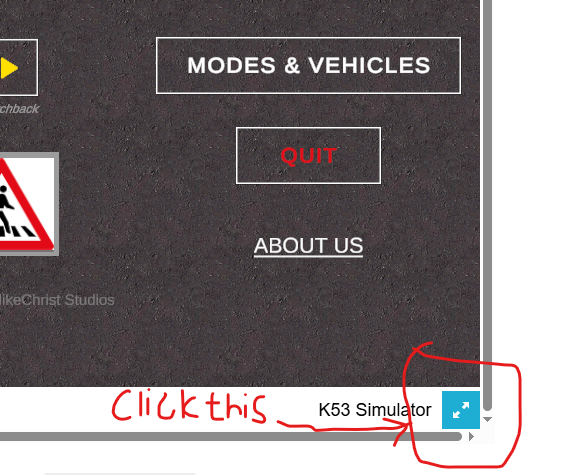
          You need to scroll to the bottom right to reveal the blue button.